TexturePacker
Create sprite sheets and optimize your game graphics.
Works with any game engine, including:
Pack your sprite sheets in seconds
Efficient packing algorithms
- Grid
- Use this algorithm if your game engine doesn't support sheet data files. All sprites are packed in an equal spaced grid.
- Basic
- The basic algorithm fills the sprite sheet from top to bottom, different sprite sizes are supported. It's the fastest algorithm but usually requires more space.
- MaxRects
- This algorithm minimizes the sprite sheet size by placing sprites in gaps between other sprites. Your game engine must be able to import packing information files — which most game engines do.
- Polygon
- The polygon algorithm removes transparent parts of the sprites to pack them even tighter. This requires a game engine that supports polygon sprites. E.g. Unity or cocos2d-x.


Trimming and identical sprite detection
- Trimming / Crop
- Trimming removes transparent areas around a sprite which allows tighter placement of the sprites. This decreases the memory usage and at the same time increases the performance of your game. A data file contains the information about the trimmed areas — this is why the sprites still behave in the same way as the original sprites in your game engine.
- Alias detection
- Sometimes it's necessary to use the same sprite multiple times, e.g. in an animation. TexturePacker detects these identical sprites and only adds them to the sprite sheet once. The animation still plays as expected because the animation frames reference the identical sprites.


Pack multiple sprite sheets
- Multipack
- Use multipack to pack all your sprites at once. TexturePacker creates the least amount of sprite sheets that can hold all your sprites.
- Filters
- Use filters to control which sprite is placed on a specific sprite sheet. E.g. put all background on one sheet or sprite sheet variants based on pre-scaled sprites.

Easy to use
- Drag & drop user interface
- To create a sprite sheet simply drag the folder containing the sprites onto TexturePacker. That's it.
- Smart-folders
- TexturePacker detects changes in your sprite folders: Newly added, renamed or deleted sprites automatically trigger a re-packing of the sprite sheet.


Some of our happy customers


Optimize graphics for your game
Support multiple screen resolutions
- Automatically downscale sprites for all devices
- Create high-resolution images only
- TexturePacker scales images
- Publish for all devices with a single click
- Automatically downscale sprites for all devices
- Prescaled images
- reduce runtime memory consumption
- increase the frame rate (fps)
- reduce download size and time
(when only loading the device-specific variant)

Optimize your png sprite sheets
Use png compressed textures to reduce the download size of your game.
- PngQuant
- Use the included pngquant algorithm to create high quality, lossy compressed png files to reduce the size of your sprite sheets.
- Zopfli compression
- TexturePacker includes Google's favorite Zopfli compression algorithm to reduce the size of the compressed PNG file even further.

Hardware compression
Use hardware compressed textures to reduce the runtime memory usage of your game.
- Use hardware compressed textures
- TexturePacker supports the following hardware texture codecs: ETC1, ETC2, PVRTC1, PVRTC2, DXT1, DXT5, ASTC, Basis Universal (with ETC1S and UASTC)
- Hardware optimized formats
- Hardware compression is available in the following image output formats: PKM, DDS, PVR, KTX, ATF, ASTC, BASIS, KTX2
- Pixel formats
- TexturePacker also supports non-compressed standard formats such as RGBA8888, RGB888, RGB565, RGBA4444 and more.

TexturePacker for artists
No more artifacts!
TexturePacker optimizes your sprite sheets in a way that reduces artifacts on your sprites. Say good bye to
- flickering lines between tiled sprites
- jagged sprite edges
- colored halos around your sprites
- strange color on sprite borders

9-scale sprites and Pivot Points
- 9-patch / 9-scale Editor
- 9-patch sprites scale the borders and content separately. They are perfect for UI elements with variable content size such as dialog boxes, buttons, and input fields. Configure your 9-patch slices in the 9-patch editor.
- Pivot point Editor
- Set your sprite's pivot points in TexturePacker's visual editor. Align animation frames while watching the result in the animation previewer.

Animation preview
Preview your sprite animation directly in TexturePacker
Bonus: The animation preview runs while you edit the pivot points. So you can see the results of your adjustments in real-time.

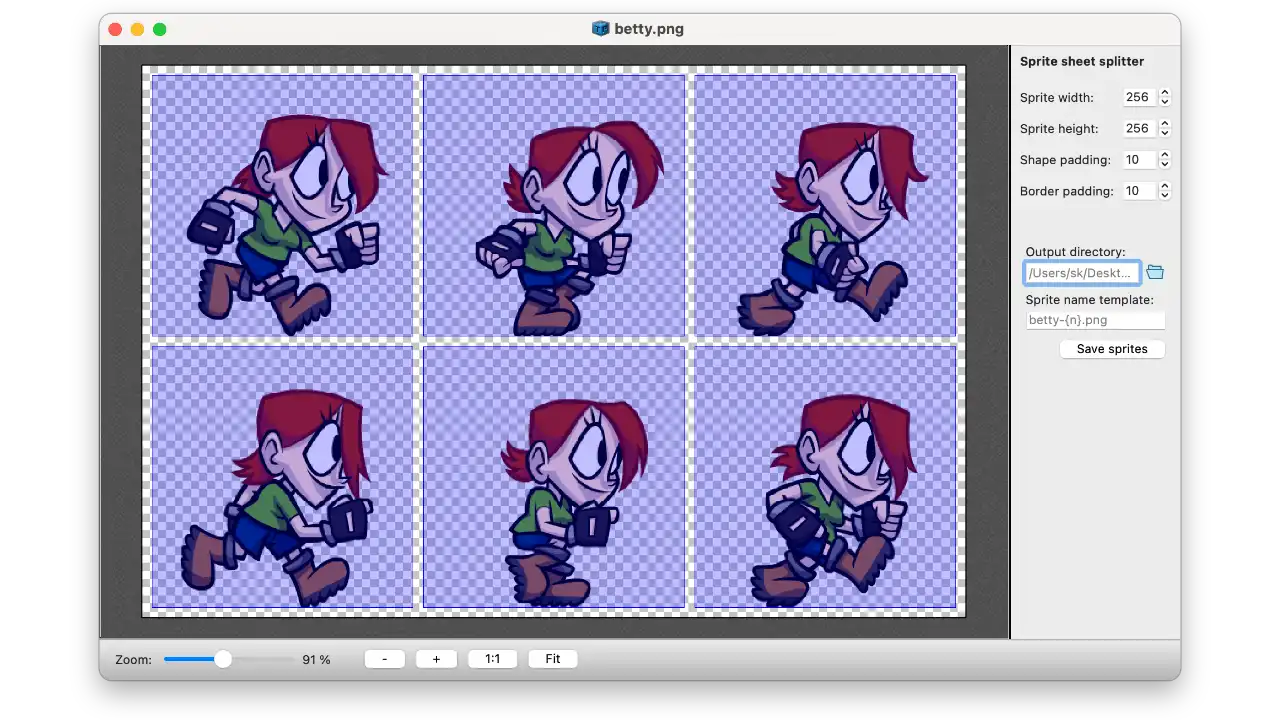
Sprite sheet splitter
“TexturePacker is hands down the best sprite sheet generation tool on the market. It has more features than any of the competition and is ready for production-level games - highly recommended!”


Works with your game engine
Many more are supported using the generic JSON and XML data formats.
- 2D Toolkit
- Amethyst
- AppGameKit
- BatteryTech SDK
- BHive
- Blacksmith 2D
- CAAT
- CEGUI / OGRE
- Solar2D / Corona SDK
- Cocos2d-x
- CSS
- EaselJS / CreateJS
- Egret Engine
- Gideros
- Godot
- Kivy
- Kwik
- LayaAir
- LibGDX
- Mapbox
- MelonJS
- Moai
- Molecule
- MonoGame
- Noesis GUI
- Orx
- Panda 2
- Phaser
- PixiJS
- PopcornFX
- Shiva3D
- Slick2D
- Spark AR Studio
- Sparrow
- Starling
- Spine
- SpriteKit
- Spriter
- SpriteStudio
- TreSensa
- UIKit
- Unity
- Unreal Engine
- Wave Engine
- x2d Engine
Your favorite engine is not here? No problem.
Tell us about it! We are happy to add new engines to our list.
You can also create your custom data format to support your in-house game engine.
“Integrating the excellent TexturePacker into my build pipeline has saved me countless hours! Not sure how I lived without it.”
Your workflow
Graphical user interface? Batch scripts? Full automation with CI?
- Graphical user interface
- Use the graphical user interface to set up the sprite sheets. The user interface shows you all changes while you tweak the settings. Save the project file or use it as a template from command line.
- Command line
- Integrate TexturePacker in your build process. Use the powerful commandline interface to build your sprite sheets. Or use the command line to update sprite sheets configured in the UI.
- Docker & CI
- Use the CI / Docker license to integrate TexturePacker in your continuous integration build. Works on both: On-premise and cloud build systems.
“Great spritesheet creation editor. Its command line version is also great for batch processing and integration with Xcode.”